
How to easily deactivate or delete a Discord account
Nowadays Discord has become a great application where you can create an account for free and quickly. The best thing about this platform is that it offers several options to communicate with people all over the world.
But since nothing is perfect, it is normal that this application also has flaws or features that many users do not like. For this reason, if you want to stop using it, you need to make the decision to delete it or disable it. Therefore, we will provide you with all the necessary information about these options and how to apply them to your account.
- What is the difference between disabling and deleting a Discord account?
- How can I delete or transfer a Discord server?
- What are the steps to deactivate and delete my Discord account?
- how can I recover a deleted Discord account?
- How does my Discord profile appear when it has already been deleted?
- What happens to messages when I delete my Discord account?
What is the difference between disabling and deleting a Discord account?
It is clear that every decision you make has an outcome, but in the case of Discord if you have noticed several problems or the application does not open for you, you need to make a decision. One of the first options is disable our account this option is to inactivate the account for a certain period of time until you want to recover it again.
On the other hand, with the delete the account will cause it to be permanently deleted without being able to recover it in the future. It should be mentioned that if you use this option, you will no longer be able to receive notifications and messages, but if you just want to deactivate it, you will still be able to receive friend requests.
How can I delete or transfer a Discord server?
If you are thinking of deleting or deactivating your account, it is necessary that everything is safe, so we need to delete or transfer the server to successfully transfer a server you must specifically enter it and click on the box where the server name is located.
Once this is done, a menu will appear where you will have to click on "Server Settings," when you access this option you will look for the "Members" option. A list with the different users of your Discord will appear; in this list look for the person to whom you want to transfer data and next to his name press the three dots icon. After that, new options will appear and press "Transfer Properties" and you are done.
Similarly, if you want to delete the server you need to log in to Discord and select the desired server. Click on the server name to display the menu, then click on "Server Settings." Once you have done that, a new window will appear with several options in which you will have to press "Delete Server," the last option in the list that appears in red. When you click on it, a prompt will appear to confirm the action you are about to perform; in this case you need to copy the exact name of the server and in some cases you will be asked for the authentication code. Then click on the "Delete Server" option to complete the process.
What are the steps to deactivate and delete my Discord account?
It should be noted that Discord offers bots to perform different types of functions on our account. However, if you have decided to deactivate your account, you need to perform a manual procedurethe best thing to do is to pay close attention so as not to make mistakes.
From a computer
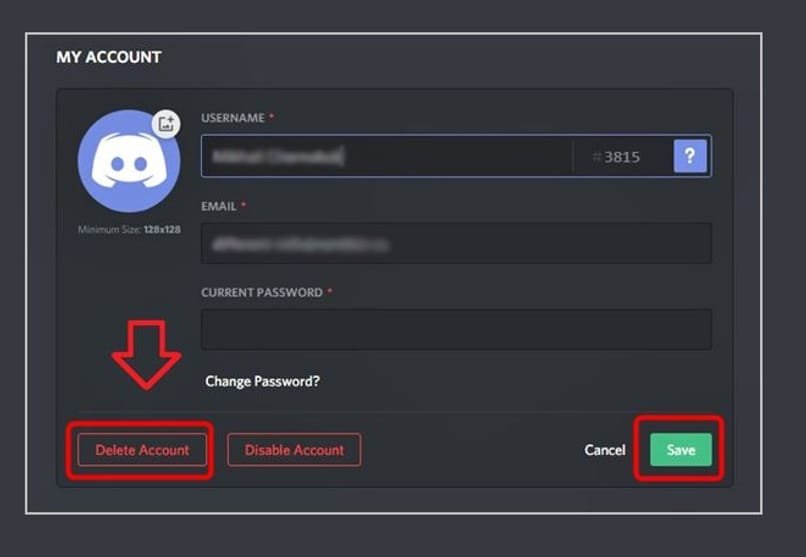
The first thing to do is to open Discord on your computer and log in as you normally would. Then, click on the user settings at the bottom next to your name when you log in click on the "My Account" option and in this area press "Edit."
Then, look for two red options and press the button that says "Deactivate your account." and you are done. Keep in mind that you must have Internet on your PC to perform this process, which is why you need to resolve connection problems before attempting this procedure.
On a cell phone
Log in to the Discord app on the cell phone, select the settings icon at the bottom, and a menu will open where you have to go to "My Account." In this section you will find the option to disable it, but when you select it, the page will direct you to support. Therefore, to remove it you need to enter the support request.
how can I recover a deleted Discord account?
When you delete your account you have only 14 days to get it back, but if you let these days pass, you will not be able to restore your account information.If you are still in time, what you need to do to get it back is to log into your account and when you do that you will see a message, where at the bottom appears the option "Restore Account," press it to get it back.
How does my Discord profile appear when it has already been deleted?
If you are in doubt about how your user account will appear after it has been deleted, its name will appear as follows "DeletedUser 0000" or a similar type of name.
What happens to messages when I delete my Discord account?
Different messages, pictures, or files you have sent in the past to any chat or server will still be available to other users. But your name will no longer be the same.
 Español
  繁體中文
繁體中文  Deutsch
  日本語
日本語  한국어
한국어  English
  Français