
How to add a friend in Discord to the friends list?
Discord is an app and digital distribution platform created specifically for the gaming communitiesfocused on text, image, audio and video communication between users on a single network. chat channel. Discord is available for Windows, macOS, Linux, Android, iOS and in web browsers.
With this application you can chat while playing a video game. We all want to play with our friends because it is much more fun to play with them.

With Discord you can add your friends to your friends list and enjoy video games together. This buddy list feature brings the old, familiar side of video games to Discord. You may have never had the need to write down all your friends on a piece of paper, but Discord's buddy list has some amazing features. Instead of having to share a server with someone in order to send you a direct message (DM)If you want to check his status, the friends list gives you direct access to him.
How to add a friend to the friends list?
If you want to add your friend to your friends listyou have to follow these steps:
- To add a person to your friends list, open friends list general by clicking on the icon above the list of servers.

- Now, click on the button that says "Add Friend".

- You will then see a small pop-up window with a text box, as shown below.

There is 3 different ways to add a friend to your friends list. Let's look at them one by one.
By Discord username and Discord tag
If you want to add a person based on their username, you can use the window you will find in the friends list.
But, if you want to add your friend via the Discord Tag, you have to be sure of these three things.
- Full name of user.
- Character "#".
- DiscordTag.
When you have finished this, you will receive a green message telling you that your request was sent successfullyor a red message telling you that something did not work. If the request was not sent correctly, make sure you have done all the steps correctly.
By the profile button
Another way to add your friend, is to go to their profile to search for the request to add directly in your profile.
- You have to click with the right mouse button in your avatar in the list of usersor, if not, in the chat window.

- Now, click on the "Profile".
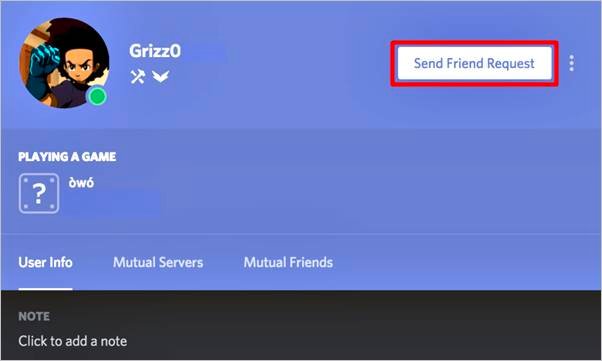
- Then you have to click on the big green button.

Right-click
The easiest and simplest way to add your friend, is that if you browse a little bit through the context menu, you will see the option of add your friend directly in the menu.

 English
  Español
  繁體中文
繁體中文  Deutsch
  日本語
日本語  한국어
한국어  Français