
Discord에 키 바인드를 추가하는 방법은 무엇인가요?
Keyboard shortcuts (keybinds), is a technique that consists of placing various skills in the player's action bar by selecting a specific key on the keyboard or mouse, or a combination of unique keys.
Generally, the goal of this is that when the player uses a specific key combination (that they have previously specified), the skill is used.

In case you are familiar with the 푸시 투 토크 function, then most likely you are also familiar with Discord's keybindings or keyboard shortcuts, as these are used to make 푸시 투 토크 work.
In Discord we can find some extra keybinding options, which can be very useful for players. So, in this article we are going to explain how to use the keyboard shortcuts so that you can take advantage of them.
How to add keyboard shortcut in Discord?
- The first thing you have to do is to enter the "User Settings" 옵션을 선택합니다.
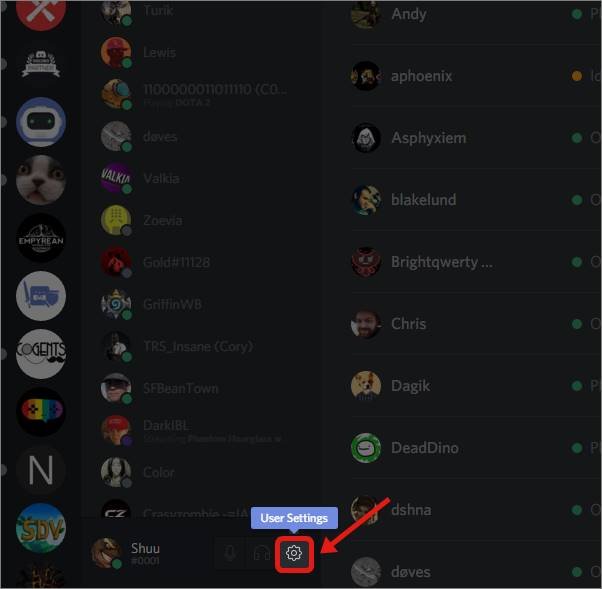
- In the sidebar you will have to click on "Keybinds".
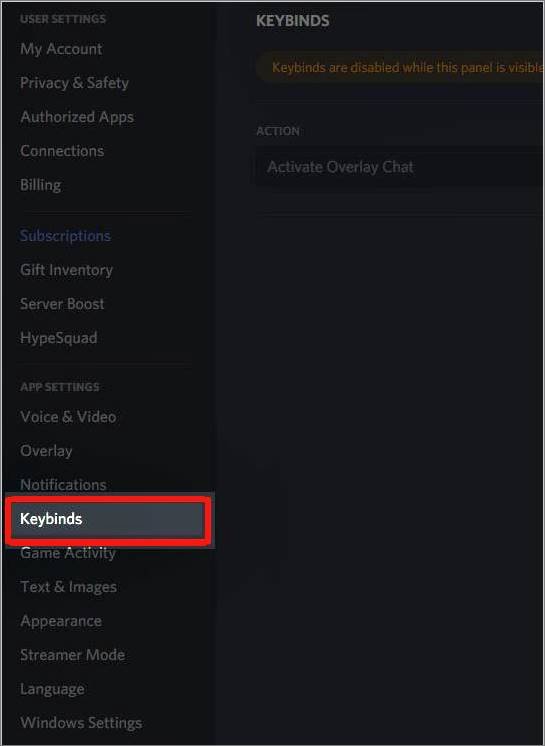
- You can add a key combination by clicking on "Add a Keybind". You can add all the key combinations as you like or you can use multiple keys to make a combination.
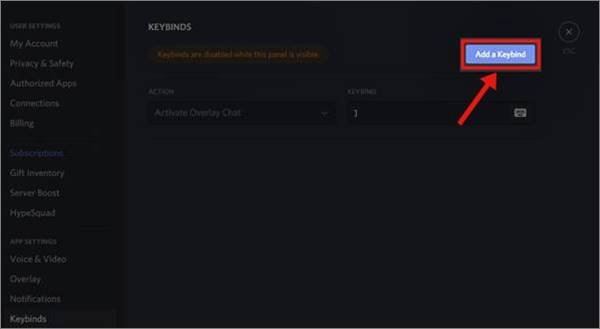
That's it, you just have to follow those three simple steps to create the keyboard shortcuts you want to use in Discord. Actually, it's a pretty simple process and you shouldn't have the slightest problem setting up the key combinations.
 한국어
한국어  Español
  繁體中文
繁體中文  Deutsch
  日本語
日本語  English
  Français